Video Game Graphics
Background Art
Background Art is the thing you see in the backdrop of a game, usually only used to add more flavour so the game isn't very bland. Interactive backgrounds.... Another way background art is used is for setting the scene. For example, if you were playing a game and the background and saw Big Ben are in London.
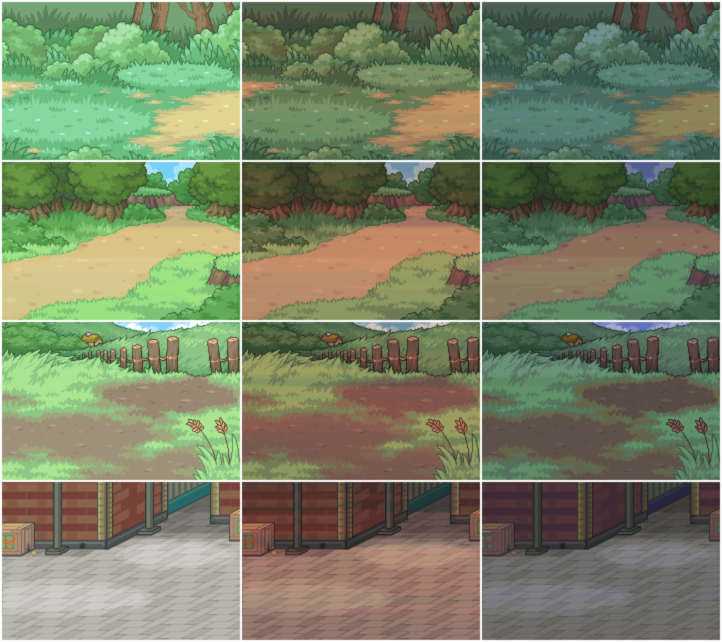
Here are some examples of background art are from the Pokémon video games. As seen below, you can tell from the image at the top that you are in a forest setting, with the background getting darker depending on the time of day. In the second picture you can see you are on a path into the forest, with the same time of day effects in place.

http://fc08.deviantart.net/fs28/f/2009/251/a/7/Battle_backgrounds_v1_by_Kymotonian.png
Texture Art
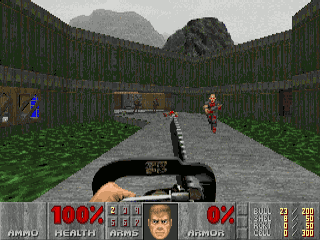
Texture Art is the name given to how the terrain, objects, characters and pretty much everything in game actually looks. As video games have progressed texture art has improved greatly to the point where games can be almost photorealistic.
 |
| An example of early video game textures |
http://upload.wikimedia.org/wikipedia/en/d/de/Doom_ingame_1.png
 |
| Modern Texturing |
http://thevrhq.com/storage/post-images/StarCitizenCockpit.jpg?__SQUARESPACE_CACHEVERSION=1350632826107
Texturing can be a difficult thing to do, not just because the job itself can be difficult, but trying to decide on how you want the textures to look as well. It's a case of falling into the Uncanny Valley, in other words, trying to make it realistic but coming up short can end up making your game unsettling to the players, but making it too cartoony/unreal and it may not fit the setting or attract the wrong audience. an example of great texture art for me is.....
Pixel Art
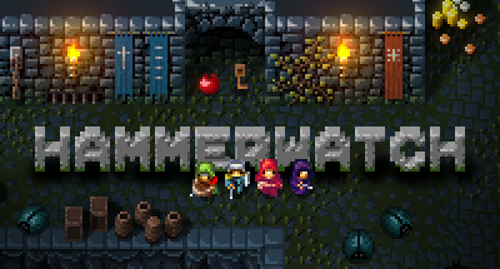
Pixel Art is an old form of digital art in which images are edited on the pixel level using raster format editing software. (I will be explaining raster graphics later in this e-zine). This style of art was used mainly in older games, having said that, it is still used today on systems with limited hardware or video games experimenting with art styles or going for a classical approach. An example of this is the indie game Hammerwatch.

http://www.co-optimus.com/images/upload/image/hammerwatch-banner.png
http://www.co-optimus.com/images/upload/image/hammerwatch-banner.png
Interface
 |
| An example of UI in video games |
In video games the User Interface is the interface in which the player views things such as maps, the objective menus, character health etc. In FPS and TPS games, a common implementation of UI is the HUD, (heads up display), which shows ammo, the compass and other such useful things. elaborate a little more.............

http://www.mobygames.com/images/shots/l/304642-mass-effect-windows-screenshot-main-in-game-menus.jpg
Print Media
Print media are the things that are used a promote a video game as opposed to the game itself. Different types of graphics and software are used to create each....... The popular forms of print media would be Video Game box art, Video Game magazines, and ......... These sorts of media will often present the game in a way which makes it look better than it really is, whether or not the game is actually good or not.

Aliens Colonial Marines was a video game widely accepted to be bad. However above you can see screenshots on the back of the box which makes the game seem quite exciting. This is an example of print media and how it is used to make it look better than it is.
Concept
In most (if not all) Video Games, there is always going to some concept design involved, whether a small amount or a lot. This is to give a framework for the artists designing the game, to the final product you see in game. More often than not the final product will look drastically different than it is in game, specifically when it comes to character design.
For example;
 |
| Concept Art |

Difference
between Raster and Vector images
Raster Images;
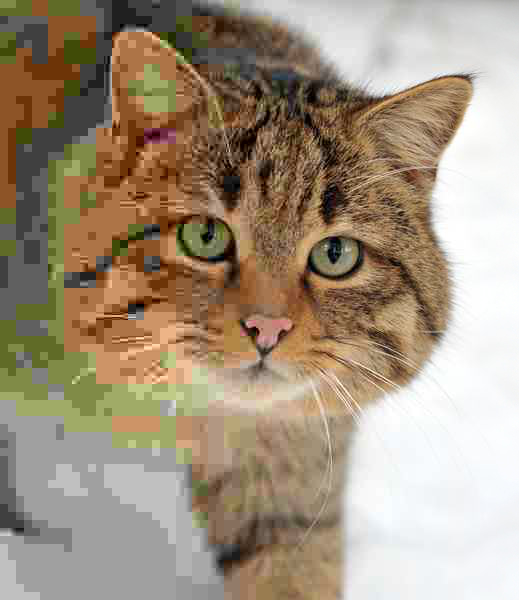
These are images made of varying quantities of pixels
depending on what the user chooses, however the downside of this being that
this can lead to these images potentially requiring very large file sizes if a
high number of pixels is chosen. Each single one of these pixels stores data
corresponding to a colour on the colour wheel allowing each individual be
edited independently if need. However, this allows the user to add as much as
little detail as is required and can edit the image in a number of different
ways, although enlarging and shrinking the image can cause it to lose a lot of quality.
Vector images;
These are images made of objects created by computer
generated mathematical equations which are done while the user draws the lines.
The benefit of this is, as they are not made out of pixels the images can be
resized as much as the user needs without loss of quality. As each line is
described by details such as its lines, thickness etc... This allows different
objects to be grouped together into one object for ease of use. Vector look
much cartoony than Raster images, and each object has one set colour.
Raster
JPEG:
This acronym stands for Joint Photographic Expert Group, and
is named after the company that made it. This group formed in 1986 with the
intention of creating the image standard, and it was released in 1992. The JPEG
file format is used to compress digital images in order to decrease the file
sizes. JEPG format images are one of the most commonly used image formats on
the Internet. JPEG, for the most part, is a lossy compression format. This
means that when saved the original images will lose some (usually unnoticeable)
detail, and the original format will be lost. The benefits of the JPEG format
is that since it was created around the time computers started becoming popular
and commercial is that it has been worked on for a while now, and is getting
better and better. This means bigger file sizes, better compression and compatibility
with all browsers.
Example of a JPEG image

GIF;
Graphic information file
format, or .gif is a bitmap image format created by Steve Wilhite in 1987 for
the CompuServe Company to provide a colour image for their downloading areas.
It has spread across the internet and is used widely and is supported by most
(if not all) web browsers and other such softwares. The .gif format stores up
to 8 bytes per pixel, which allows
a single image to use up to 256 different colours from the 24-bit colour
spectrum. The benefit of this format is that it allows moving images with a
decent amount of quality and colour to them with relatively small file sizes.
PNG;
Portable Network Graphics, or PNG, is a bitmap
image format created to be an upgrade to .gif in early 1995 due to the fact
that it’s limit to 256 colours at a time when more colours were becoming
available with computers made a replacement desirable. It supports lossless
data compression, and is the best lossless compression format currently
available. The benefit of this is that there is an image format that allows
animation while allowing more colours and effect compression done by looking
for patterns in the image.

TIFF;
TIFF, or the Tagged Image File Format, is a very flexible
image format, and usually offers the best quality output possible with digital
cameras. Its first release was in 1986 under the Aldus Corporation after two
earlier draft releases. This image format was created as an attempt to make
desktop scanner vendors to agree on one common image format rather than have
each vendor create and promote their own format. Aldus Corporation and the TIFF
format are now under the control of Adobe Images. The problem with TIFF is that
they produce very large file formats not suited for web use, however, TIFF is a
lossless format meaning that it will not lose quality when saved numerous
times.
BMP;
The BMP file format, or bitmap image file, or simply bitmap, is a Raster
file format which is used to store digital images separately from the display
device. The bitmap file format is capable of storing 2D digital images in
various widths, heights and resolutions.
Vector
Wmf;
Wmf, or Windows Metafiles, is an image format
developed for Microsoft Windows in the 1990s. Windows Metafiles can contain
both Raster of Vector graphics, and are able to transfer to multiple applications,
such as Microsoft word and PowerPoint, as well as being the native vector
format for both of these applications.
swf;
This is Vector file format used in Adobe Flash
which allows you to create your vector graphics and multimedia. It was
originally created by FutureWave Software in 1996 who were later taken over by
Adobe in 2005. Swf is currently the dominating form of graphic for vector
animations, and is commonly found in cartoon animations and browser games.
Ai;
This is a proprietary vector file format developed by adobe
systems for use in Adobe Illustrator, used to represent single page drawings
which can later be changed into either the EPS or the PDF file formats. The AI
format was originally a native file format called PGF
Capturing Images with a Digital Camera
Digital Cameras are one of the most prominent and common
forms of image capturing, among others such as built in cameras in phones. Digital
cameras use incredibly small (roughly fingernail sized) sensors covered with
millions of even tinier diodes, each of which capture a pixel for the final
product picture. So naturally, the more diodes the more pixels will be present
resulting in a better looking picture.
The diodes, however, do not capture the colour, only varying tones from white to black. This is known as the grey scale. Rather, when the shutter opens and closed the diode records the brightness that falls on it, and the charge from each pixel is measured and made into a digital number. These numbers are then used to reconstruct the image, setting the brightness and colours from matching pixels on screen.
Colours in an image are usually based on something called the primary colours; Red, Green, and blue, otherwise known as RGB. These are the colours your eyes see things in, and are the colours your desktop monitor display in. Due to the photo sensitive diodes only capturing pixels in greyscale, colours are added by placing RGB filters on top of them. Each of the sensors have a colour filter which only lets in one colour, with every colour then being recorded separately by the camera before being mixed in with all of the other colours in the image. This is called interpolation, and quality of this is effected by the image format used, size selected, and compression picked when using the camera.
However, Interpolation is not the only thing affected by these settings. When capturing an image, the camera has only a few short moments to preview the image taken, capture it, filter the data, store the image, transfer the data, and display it on screen. How well it does these things is also affected by the aforementioned settings.
The diodes, however, do not capture the colour, only varying tones from white to black. This is known as the grey scale. Rather, when the shutter opens and closed the diode records the brightness that falls on it, and the charge from each pixel is measured and made into a digital number. These numbers are then used to reconstruct the image, setting the brightness and colours from matching pixels on screen.
Colours in an image are usually based on something called the primary colours; Red, Green, and blue, otherwise known as RGB. These are the colours your eyes see things in, and are the colours your desktop monitor display in. Due to the photo sensitive diodes only capturing pixels in greyscale, colours are added by placing RGB filters on top of them. Each of the sensors have a colour filter which only lets in one colour, with every colour then being recorded separately by the camera before being mixed in with all of the other colours in the image. This is called interpolation, and quality of this is effected by the image format used, size selected, and compression picked when using the camera.
However, Interpolation is not the only thing affected by these settings. When capturing an image, the camera has only a few short moments to preview the image taken, capture it, filter the data, store the image, transfer the data, and display it on screen. How well it does these things is also affected by the aforementioned settings.
The most common form of compression used by digital camera
would be lossy compression, due to most cameras sacrificing features and
picture quality to allow for compactness and mobility.
(http://en.wikipedia.org/wiki/Digital_camera was used for info on most common camera compression used, all other info was drawn from PowerPoint slide )
(http://en.wikipedia.org/wiki/Digital_camera was used for info on most common camera compression used, all other info was drawn from PowerPoint slide )
Capturing images using Scanners
The core component of any scanner is the CCD Array. The CCD is a collection of light sensitive diodes which diodes convert light into electrodes, and is the most common form of technology currently used in image scanners.
There are many different components to a scanner, and various steps to scanning.
The first step to scanning an image is to have physical copy of the image. You then take this and place it on the glass plane on the scanner and pull the cover over to stop any light from escaping. The cover also acts as a background for the scanner to use as a reference point to determine the size of the object being scanned, however it can usually be removed to allow scanning of bigger objects.
After the object is placed on the glass plane and the cover is closed a lamp will illuminate below, lighting up the document so it can be scanned. Scanners originally used fluorescent lamps, but newer scanners often use cold cathode fluorescent lamps (CCFL) or a xenon lamp.
The scan head (made up of mirrors, lens, filter and aforementioned CCD array) now slowly begins to move across the document by a belt which is attached to a stepper motor (a device that basically rotates, moving the belt with it and allowing the movement). As well as this, there is also a stabiliser bar which is there to ensure there is no wobbling as the scan head passes the object which could mess up the scan.
The image taken of the object it then passed between two or three angled mirrors, depending on the scanner, which are also slightly curved. This focuses the image taken meaning it will look much better as it reflects onto a smaller surface. The last mirror reflects the image onto a lens, which focuses the image through a filter on the CCD array.
The filter and lens can vary depending on the scanner, but they all do the same job. The scanner will scan the image three or so times, each time using a different colour filter (the RGB mentioned with the digital camera summary) between the lens and CCD array. Once this is done the three scans will be assembled into one full colour image.
Once the image is scanned, something actually needs to be done with it, such as transferring it to your computer. There are three common ways this can be done. You could stick the scan onto a USB stick and transfer it that way. This is effective as it is fast, easy to do and USBs are easy to get. Another way is the parallel port, the slow way of doing it. If you have the printer hooked up directly to your computer you can transfer it directly that way. Another method would be using FireWire. While this is faster than the other methods mentioned, it is usually only found on higher end scanners but is ideal for high resolution scans because of this.
To actually be able to use your scanner, you’re going to need a software (called a driver) that knows how to communicate with the scanner. Luckily, most scanners are built with the TWAIN language, which means that applications need only know this language to be able to interact with scanners. Because of this applications need not know specific details of the scanner; as long as they know the language they can access it directly. So, for example, if you scan an image and want to edit it in Adobe Photoshop you could do this, as PhotoShop supports the TWAIN language.
Lossy Compression
Lossy compression is a form of compression used to reduce
the generally bulky file sizes of bitmap images. Lossy compression compromises
good quality and file size by deleting “unnecessary” data that, in most cases,
the human eye wouldn't’t recognise anyway. JPEG image files are a popular bitmap
file type that use lossy compression.
Lossless Compression
Lossless compression is a form of compression used to compress files down as much as possible while still retaining all of the data from the original format. The difference between lossy and lossless here, besides the losing/not losing data, is that lossy compression is only giving an approximation of original data whereas lossless gives a perfect reconstruction.